


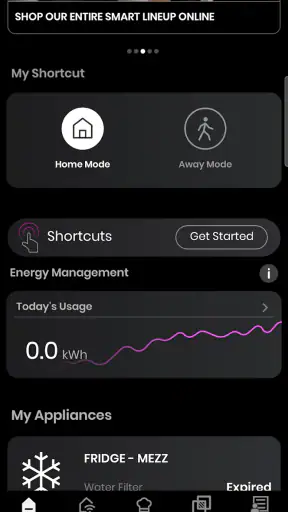
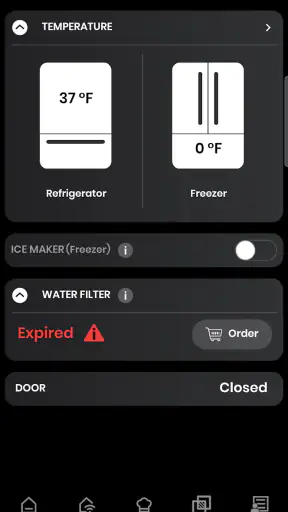
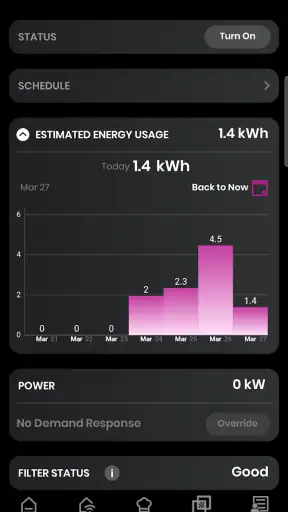
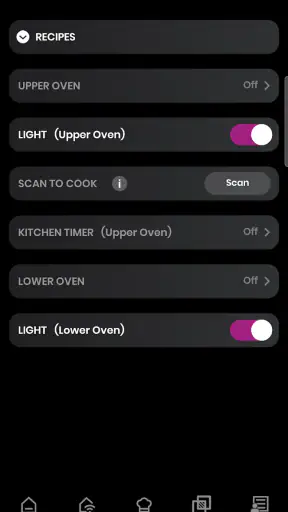
SmartHQ is the kind of lifestyle app that makes sense only after you connect it to the right GE Appliances equipment. I used it with that expectation rather than treating it like a general smart-home dashboard, and that distinction matters. The app is built around managing compatible GE appliances from a phone, so its usefulness depends less on how many screens it offers and more on whether it fits the appliances already in your home.
My overall impression is positive, but practical rather than exciting. SmartHQ can reduce small daily annoyances, especially when I want to check an appliance without walking to another room or remember what needs attention. At the same time, it is not a universal control center for every brand, and people without compatible GE equipment have little reason to install it. The free price makes trying it easy, while the 4.3 average from roughly 40 thousand ratings suggests that many users find it worthwhile, even though a connected-appliance app will always have some setup and communication friction.
What using SmartHQ feels like day to day
The first thing I would tell a friend is to think of SmartHQ as a companion for GE Appliances, not as a replacement for every smart-home app on a phone. Its purpose is narrow enough to be understandable: bring supported appliance information and controls into one mobile place. That focus is useful because I do not have to search through unrelated home-automation features to find the appliance I care about.
In an ordinary household, the value appears in small moments. I might be upstairs and want to check whether a connected appliance is still running, or I might be preparing to leave and want one more look at its status. Instead of interrupting what I am doing, I can open the app and make the check from my phone. That is not a dramatic change to home life, but repeated small conveniences are exactly where this sort of software earns its place.
The setup experience is also where expectations need to be realistic. A phone app cannot make a non-connected appliance smart, and compatibility should be the first thing checked before spending time on account creation or pairing. If your home includes several supported GE products, the centralization is more convincing. If you own one appliance and rarely need remote visibility, the benefit may feel modest.
GE Appliances is the developer, and the app has been available since late August 2015. That long presence gives it the feel of an established companion product rather than a brand-new experiment. It is free to install and rated for Everyone, so the barrier to trying it is low. The current version is 1.0.0.117.1, running on devices with at least Android 9.
Speed expectations: quick checks matter more than flashy motion
For SmartHQ, perceived speed is mostly about how quickly I can reach useful appliance information and how clearly the app reflects the current state. This is not an app where animated transitions or elaborate visual effects determine quality. A simple screen that gets me to the correct appliance is more valuable than a polished interface that makes me wait or hides important status details.
In my experience, the best workflow is to open the app with a specific purpose: check an appliance, review its current state, or manage something that I would otherwise inspect manually. That keeps the interaction short. I would not open it expecting a general news feed or a constantly changing smart-home overview. Its strength is the focused check, not entertainment or exploration.
There is an important difference between app responsiveness and appliance response. The phone interface may open normally while the appliance itself takes longer to report a change, depending on the connection between the phone, the service, and the appliance. I would avoid repeatedly tapping a control just because the result is not visible immediately. That can create uncertainty about whether the first request worked.
A useful habit is to pause after sending an instruction, then refresh or revisit the relevant appliance view rather than issuing the same command several times. This is one of the less obvious trade-offs of connected appliances: convenience comes with a need to confirm state. For routine monitoring, that is manageable. For an action where timing is critical, I would still check the appliance directly.
Heavy-use moments: where the app earns its place
SmartHQ becomes more useful when several appliance-related decisions happen close together. Imagine preparing dinner while handling laundry and getting ready to leave the house. I can use the phone to check whether a connected appliance still needs attention, then return to cooking without walking between rooms. The benefit is not that the app performs a complicated task for me; it is that it reduces interruptions.
Another realistic use is checking from outside the immediate room. If I am already in bed, working in a home office, or carrying groceries through the door, a quick status check can be more convenient than retracing my steps. This is especially helpful for people who frequently forget whether they started a cycle or whether an appliance is still active.
Homes with multiple compatible GE products get more from the app than homes with a single occasional-use appliance. The more often I need to move between appliances, the more valuable a shared mobile entry point becomes. That is a concrete reason to keep the app installed rather than using it once during setup and forgetting about it.
There is also a practical organization tip here: name or arrange connected appliances in a way that makes sense to the people using the phone. A vague label can turn a quick check into a guessing exercise, especially in a home with similar appliances. Clear identification is a small detail, but it directly affects speed and prevents mistakes when I am distracted.
Heavy use can expose the limits of a connected system. If the home network is busy, the appliance is not communicating properly, or the app has stale information, the experience becomes less immediate. SmartHQ is most comfortable as a convenience layer, not as the only way to know what is happening. I would not rely on a phone display alone for safety-sensitive decisions or for anything that requires physical confirmation.
Reliability: useful when treated as a status aid
Reliability in SmartHQ has two parts. The first is whether the app itself remains usable when I open it. The second is whether the information shown corresponds closely enough to the appliance’s real condition. The first is relatively easy to judge; the second depends on the whole connected setup and is naturally more variable.
My approach is to treat the app as a helpful status aid rather than an unquestionable authority. If it shows that an appliance is available or has completed an activity, that can save me a trip. If something seems inconsistent, I verify it at the appliance. This is not a criticism unique to SmartHQ; remote control always introduces a layer between the user and the physical device.
Recovery is another part of reliability that deserves attention. If a status does not update, I would first wait briefly and check again instead of assuming the appliance has failed. If the problem continues, I would confirm that the phone can reach the internet, check the appliance directly, and then revisit the connection process. A calm sequence is better than repeatedly sending commands or immediately deleting and reinstalling the app.
That recovery mindset is particularly important after changing home-network equipment, moving an appliance, or replacing a phone. Connected products can be dependable during normal use but require attention after a network or account change. SmartHQ is not a substitute for understanding how the appliance is connected, so users who want completely invisible automation may find this category more demanding than expected.
The app has passed one million installs, which gives it a substantial user base for a brand-specific appliance companion. That does not guarantee a perfect experience in every home, but it does make SmartHQ feel like a mainstream option for GE owners rather than an obscure utility. I would still judge it by the compatibility and connection quality of my own household.
Device constraints and resource expectations
SmartHQ is designed for Android devices running version 9 or later. That requirement is reasonable for many current phones, but it immediately excludes older hardware. Anyone using an aging phone should check the operating-system requirement before planning around the app, particularly if the phone is kept as a dedicated household controller.
On a supported phone, I would expect the app’s demands to be fairly ordinary for a lifestyle utility. Its job is to present appliance information and controls, not to render games, edit video, or process large files. The more meaningful resource question is whether it remains convenient to keep installed and open when needed, not whether it can push a phone’s processor.
Still, an older or heavily loaded device can make any connected-home app feel slower. Limited storage, an outdated operating system, weak network access, or aggressive background restrictions can all affect the experience. If SmartHQ seems unreliable, I would avoid blaming the interface immediately; I would first test the phone’s connection and confirm that the appliance itself is reachable.
People concerned about phone clutter should also ask whether they will actually use remote checks. A free app costs nothing to download, but every rarely used app adds another account and another place to look for household information. SmartHQ earns its space when it replaces repeated trips to the appliance or helps manage several compatible products. It is less compelling if installed only because the word “smart” sounds useful.
The Everyone age rating makes the app approachable for a household shared by different family members. In practice, though, ease of use depends on how clearly the appliances are identified and how comfortable users are with connected-device setup. A simple explanation of which appliance is connected and what the app is being used for can prevent confusion better than any interface shortcut.
How it compares with ordinary alternatives
The obvious alternative is using the appliance itself. For a person who is usually in the same room and does not need remote visibility, physical controls are simpler, immediate, and independent of the phone. There is no account to open, no connection status to interpret, and no concern about whether a remote update has arrived.
The second alternative is a broader smart-home platform. That approach can be better for someone whose home mixes products from many manufacturers and who wants one ecosystem for lighting, security, speakers, and appliances. A brand-specific app like SmartHQ is less universal, but it may be more focused for GE equipment. I would choose the broader platform when cross-brand routines are the priority; I would choose SmartHQ when appliance-specific access is the main need.
There is also the alternative of using several manufacturer apps. That can become messy, especially when each product has its own login and layout. SmartHQ’s appeal is strongest when it reduces that fragmentation within the GE appliance side of the home. It does not solve every smart-home problem, but it can make one important part of the household easier to manage.
This comparison reveals a key trade-off: breadth versus relevance. A universal platform may cover more device types, while SmartHQ can feel more direct for supported GE products. I would not recommend installing it as a general-purpose home-control app, but I would recommend considering it if the household already revolves around compatible GE appliances.
Who should use it, and who should skip it
I think SmartHQ is a good fit for GE appliance owners who regularly move around the home, forget whether a cycle is complete, or want a phone-based way to check connected equipment. It is also more attractive for households with several compatible products, because the effort of setting up the app is repaid through repeated use.
It may be especially helpful for someone managing a busy routine: a parent balancing chores, a person working from home, or anyone who wants fewer unnecessary trips between rooms. The convenience is cumulative. One remote check may seem minor, but the ability to make those checks throughout the week can change whether the app feels useful.
I would skip it if I do not own compatible GE equipment, if I strongly prefer physical controls, or if I need a single app that manages devices from many unrelated brands. I would also be cautious if my home network is unreliable and I am unwilling to verify appliance status manually. Connected control is not a good match for someone who expects every command to be instant and invisible.
Before installing, I would identify the exact GE appliances I want to connect and decide what problem the app should solve. “I want to check whether this appliance is finished from another room” is a clear reason. “I want a smart home” is too broad, and SmartHQ alone is unlikely to satisfy it.
My performance verdict after weighing convenience against friction
SmartHQ performs best as a focused companion for compatible GE Appliances. Its perceived speed is most satisfying during short, purposeful checks; its resource demands should be modest on a supported phone; and its reliability is strongest when I use it as an aid rather than as the sole source of truth. The moments that matter are not flashy demonstrations but ordinary interruptions that the app can remove.
The friction comes from the nature of connected appliances. Pairing, compatibility, network conditions, delayed status updates, and the need to confirm uncertain results are all part of the experience. None of that makes the app unusable, but it means I would not describe it as completely effortless. Users who understand that trade-off are more likely to appreciate what it does.
For a free lifestyle app from GE Appliances with a mature history and a large installed base, SmartHQ is worth trying when it matches a real household need. I would recommend it to compatible GE owners who want convenient remote awareness, especially those managing more than one connected appliance. I would not recommend it as a universal smart-home replacement or as a reason to buy into connected devices by itself.
My final recommendation is simple: install SmartHQ when your GE appliances can save you repeated trips or help you keep track of a busy home. If your appliances are not compatible, your phone is below Android 9, or you want broad cross-brand automation, a different approach will serve you better. For the right household, though, this app turns appliance checks into quick phone interactions without pretending to be more than it is.
With an Everyone rating and no purchase price, there is little financial risk in testing that fit. The real question is whether the convenience becomes part of your routine. In my view, SmartHQ is most successful when it quietly answers that question during everyday chores and then gets out of the way.


